Percentage Increase Calculator – Calculate Percentage Growth
This percentage increase calculator shows by what **percentage a value has grown**, from a starting value to an ending value. It works for any before‑and‑after comparison and is also commonly used as a **percentage growth calculator** — whether yearly, monthly, or over several years. Use this tool whenever you want to measure how much a value has increased between two numbers. Typical examples include: - price increases - salary or revenue growth - population or membership growth - exam score improvements - business or user growth over time Enter the **starting value (Vi)** and the **ending value (Vf)** to calculate the percentage increase instantly. If you need growth measured **over multiple years**, such as annualized growth, see the CAGR calculator. For general percentage change in any direction, visit the percent change calculator.Percentage Increase Formula
To find the percentage increase, use: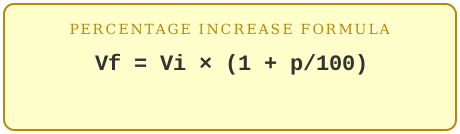
This formula tells you what percentage the value has grown relative to the starting value.
Examples of Percentage Increase
Example 1: Price increaseA $250 phone increases in price to $270.
(270 − 250) / 250 × 100 = 20 / 250 × 100 = 8
The price increased by 8%.
Example 2: Rent increase
Monthly rent goes from $1,200 to $1,242.
(1242 − 1200) / 1200 × 100 = 42 / 1200 × 100 = 3.5
The rent increased by 3.5%.
Example 3: Population growth
A town of 5,000 people grows to 5,600 over five years.
(5600 − 5000) / 5000 × 100 = 600 / 5000 × 100 = 12
The population increased by 12%.
When to Use This Calculator
Use this calculator whenever you know both the **starting value** and the **ending value** and want to find the percentage increase.Common uses include:
- price increases over time
- salary or revenue growth
- population or membership growth
- year‑over‑year comparisons
- any before‑and‑after increase
If you already know the starting value and the percentage you want to add, and need the resulting new value, use the percent addition calculator.
Frequently Asked Questions
What if the ending value is lower than the starting value?Then the value decreased rather than increased — the calculator will show this as a decrease so you can see the true direction of the change.
What if the starting value is negative?
See the dedicated percentage change for negative numbers calculator, which handles negative starting values correctly.
How is this different from the percentage decrease calculator?
Both use the same formula — two known values in, percentage change out — but this one is framed for increases. The percentage decrease calculator is framed for decreases, and either one will show the correct direction.
Is this the same as percentage difference?
No. Percentage increase assumes a clear starting point and ending point. If neither value is “before” or “after,” such as two prices from two stores, use the percentage difference calculator instead.
Related tools: percentage decrease calculator & full percentage change formula guide.