Increase a Number by Percentage – Formula and Examples
This calculator adds a percentage to a number, giving you the new, larger value. Enter the starting number and the percentage you want to add. This is useful for:- adding sales tax to a price
- applying a markup to a cost
- calculating a salary after a raise
- projecting growth by a fixed percentage
- any "what if I add X%" question
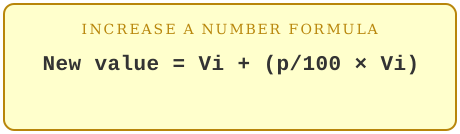
Formula
Examples
Example 1: Sales taxAdd 8% sales tax to a $200 purchase.
200 + (200 × 8 / 100) = 200 + 16 = 216
The total is $216.
Example 2: Markup
A wholesaler adds a 30% markup to a $40 product.
40 + (40 × 30 / 100) = 40 + 12 = 52
The retail price is $52.
Example 3: Fixed growth projection
Increase this year's 800 members by an expected 15% next year.
800 + (800 × 15 / 100) = 800 + 120 = 920
Projected membership: 920.
When to Use This Calculator
Use this when you know the starting number and the percentage you want to add, and need the resulting value. If instead you know both the starting and ending values and want to find the percentage between them, use the percentage increase calculator instead.Frequently Asked Questions
Can I use this for a decrease instead?Use the reduce a number by percentage calculator for subtracting a percentage.
What if I want to add tax and then a discount?
Run the calculation twice, in order — percentages don't stack additively (see our guide on compounding for why).
Related tools: reduce a number by percentage and percentage increase calculator.