Salary Percentage Increase Calculator – See Your New Annual and Monthly Pay
This calculator shows how much your salary increases after a percentage raise. Enter your current annual salary and the raise percentage you were offered (or are negotiating), and the calculator will display:- your new annual salary
- how much more that is per year
- an approximate monthly increase
This makes it useful for:
- evaluating raise offers
- preparing for salary negotiations
- estimating cost‑of‑living adjustments
- checking performance review increases
- comparing raise scenarios
Salary Increase Formula
To calculate your new salary after a raise, use: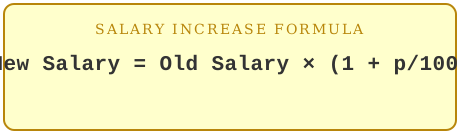
Where:
- old salary = your current annual pay
- p = raise percentage
- new salary = old salary × (1 + p/100) A positive percentage gives a raise; a negative percentage gives a salary cut.
Examples of Salary Percentage Increase
Example 1: 4% raiseYour salary is $55,000 and you receive a 4% raise.
55,000 × (1 + 4/100) = 55,000 × 1.04 = 57,200
Your new salary is $57,200 — about $183 more per month.
Example 2: 6% performance raise
A starting salary of $42,000 gets a 6% raise.
42,000 × 1.06 = 44,520
The new salary is $44,520 — about $210 more per month.
Example 3: 2.5% cost‑of‑living adjustment
A salary of $80,000 gets a 2.5% COLA increase.
80,000 × 1.025 = 82,000
The new salary is $82,000 — about $167 more per month.
When to Use This Calculator
Use this calculator specifically for salary raises, because it shows both:- the new annual salary
- the approximate monthly increase
For a general percentage increase on any other type of value (value + percentage → new value), use this calculator: increase a number by a percentage.
Frequently Asked Questions
Does this calculate the raise before or after tax?This calculator shows the gross (pre‑tax) salary increase. Your actual take‑home pay will depend on your tax situation.
How do I find the raise percentage if I already know my old and new salary?
Use the percentage change calculator with your old salary as the starting value and your new salary as the ending value.
Can I use this for a salary cut instead of a raise?
Yes. Enter a negative percentage (e.g., −5 for a 5% cut) to see the reduced salary.
Related tools: general percentage increase calculator & inflation calculator.