Reverse Percentage Change Calculator – Find the Original Value
This reverse percentage change calculator works backwards: instead of applying a percentage increase or decrease to an original value, it helps you **recover the original value** when you only know the final value and the percentage change that was applied. It is especially useful for **calculating the original price after a percentage decrease**, such as discounts, or for undoing any percentage increase. You can also use it to find pre‑tax prices, original salaries before raises or cuts, and original population values before growth or decline. Enter the final value (Vf) and the percentage change (p). Use a negative percentage for decreases.Reverse Percentage Change Formula
To find the original value Vi, use: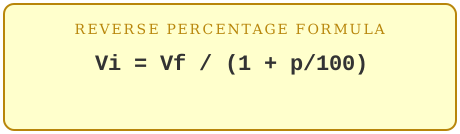
This formula works for both increases and decreases:
- For an increase, p is positive
- For a decrease, p is negative
The denominator adjusts the final value back to its original scale.
Examples of Reverse Percentage Change
Example 1: Undoing a price increaseAfter a 25% price increase, a laptop now costs $375.
Vi = 375 / (1 + 25/100) = 375 / 1.25 = 300
The original price was $300.
Example 2: Undoing a discount
After a 20% discount, a jacket costs $80.
Vi = 80 / (1 − 20/100) = 80 / 0.8 = 100
The original price was $100.
(For decreases, enter the percentage as a negative number, e.g. −20.)
Example 3: Undoing a population decline
After an 8% decline, a town’s population is 4,600.
Vi = 4600 / (1 − 8/100) = 4600 / 0.92 = 5000
The original population was 5,000.
When to Use This Calculator
Use this calculator whenever you know the result of a percentage change and need to find the original value. Common uses include:- pre‑discount price from sale price
- pre‑tax price from tax‑inclusive price
- original salary before a raise or cut
- original population before growth or decline
- reversing percentage changes in finance or statistics
To go forward instead — from an original value and a percentage to a new one — use the increase a number by percentage or reduce a number by percentage calculator or return to the percent change calculator.
Frequently Asked Questions
How do I enter a decrease?Enter the percentage as a negative number, e.g. −20 for a 20% decrease.
What if the percentage entered is −100%?
This case is undefined, because it would require dividing by zero. A −100% change means the final value is zero, which cannot be reversed to a single original value.
Is this the exact opposite of the increase/decrease calculators?
Yes. Those calculators move forward from original value to final value. This calculator moves backward from final value to original value.
Related tools: percentage increase calculator & full percentage change formula guide.